

Google reviews are one of the most visible trust signals a service business has. When a homeowner is choosing between a few local companies, the reviews on a Google Business Profile often tip the decision long before a phone call is ever made.
Honest reviews matter more than perfect ones. Real feedback from real customers helps build long-term credibility, gives potential clients a clearer picture of what to expect, and gives the business useful information to improve. Inflated ratings and spammy tactics tend to backfire and can put a profile at risk.
The goal is simple: make it easy for happy customers to share their experience, and stay professional about how you ask.
Make It Easy For Customers
Most customers are willing to leave a review when they have had a good experience. The problem is rarely willingness. The problem is friction.
- Customers are far more likely to leave a review when the process takes seconds, not minutes.
- Many will not search for your business later, even with good intentions, because daily life gets in the way.
- Direct review links and QR codes remove that friction and put the review screen one tap away.
Use Your Google Review Link and QR Code
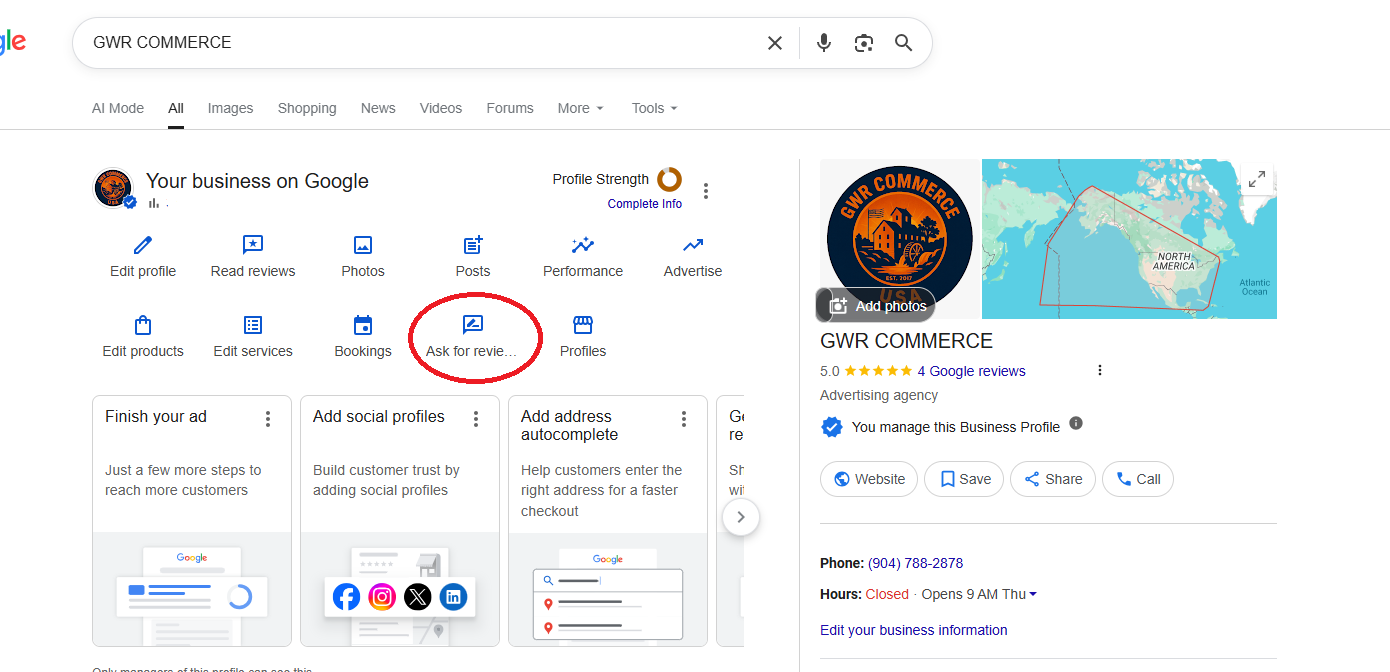
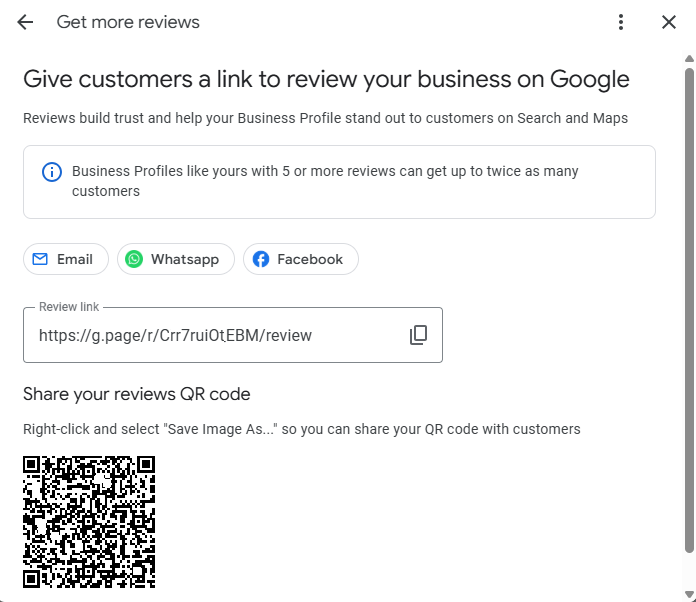
Google lets every verified business generate a direct review link and a matching QR code from inside the Google Business Profile dashboard. Both point straight to the review screen for your profile.
These work well in places customers already encounter:
- Business cards and leave-behind cards
- Printed invoices and receipts
- Follow-up text messages after a completed job
- Email signatures and thank-you emails
- CRM and FSM workflows that close out a service ticket
For most service businesses, a short follow-up text with the direct review link is one of the easiest and most effective methods. The customer taps once and is already on the review screen.
Where To Find Your Google Review Link and QR Code
Train Your Technicians To Ask Naturally
In most service businesses, the technician is the last person the customer sees. That makes them the most natural person to mention a review, and the most credible.
Scripted, sales-flavored requests usually feel awkward. A short, genuine conversation works much better. Customers can tell the difference, and they respond to it.
"Would you be willing to leave me an honest review? Reviews help my boss and future customers understand how we're performing in the field. Since I'm not working in the office directly with management every day, customer feedback is one of the best ways they can see how I'm doing out here."
This approach works because it:
- Feels personal instead of transactional
- Avoids sounding like a sales pitch
- Invites honest feedback rather than a specific rating
- Helps both the technician and the business improve
Do Not Spam Customers
One ask in person and one polite follow-up message is usually plenty. Repeatedly nudging the same customer can come across as pushy and may damage the relationship you just built on the job.
- Avoid sending multiple review requests within a short window
- One in-person ask plus one follow-up is a reasonable cadence
- If a customer does not respond, leave it alone
Ask For Honest Reviews, Not 5 Star Reviews
Asking specifically for a 5 star review puts the customer in an awkward position and can pressure them into something that does not reflect their real experience. It can also violate Google's review policies.
- Ask for honest feedback in plain language
- Let the customer choose the rating that matches their experience
- Honest reviews build stronger long-term trust than a wall of perfect ratings
Avoid Asking Every Single Customer
Common sense still applies. A customer who is frustrated, confused, or had a difficult experience is usually not the right person to push for a public review in that moment. Focus on resolving the issue first.
- Use judgment based on how the job actually went
- Handle complaints and concerns before bringing up reviews
- Good communication and follow through still matter more than any review tactic
Use Your CRM or FSM Software
Most modern CRM and field service platforms can automate review requests at the right point in the workflow. Used reasonably, this keeps your follow-up consistent without adding work for the office.
- Post-job text messages triggered when a ticket is closed
- Follow-up emails that include a direct review link
- Service closeout workflows that prompt the technician to ask in person
Automation should still feel professional. Keep the message short, polite, and limited to one follow-up.
Consistency Matters More Than Volume
Steady, ongoing review growth tends to look more natural than sudden spikes. Google and potential customers both notice patterns.
- A few honest reviews each month outperform a burst of reviews followed by silence
- Long-term consistency builds a credible profile over time
- You do not need hundreds of reviews overnight to compete
Final Thoughts
Getting more Google reviews is not about clever tricks. It comes down to doing good work, making it easy for customers to share their experience, and asking in a way that respects their time.
Stay professional, stay consistent, and ask for honest feedback. Over time that approach builds the kind of profile that earns trust from both Google and the customers comparing you to everyone else in your area.